


Professional Diploma in Game Development

Professional Diploma in Game Development course concept artwork
Adobe Photoshop
+
Unreal Engine
◷ 12 Months + Internship◈ Multimedia
YOUR CREATIVE TOOLKIT
Adobe PhotoshopUnreal Engine

Professional Diploma in Game Development

The Professional Diploma in Game Development is a complete 1-year program designed to take students from beginner-level game development fundamentals to advanced gameplay production.

THE CREATIVE PROCESS / Game Development

Turn an idea into something playable.

Game development gives rules and interactions a working form. Player actions need clear responses, systems need to behave consistently and the experience needs to remain understandable as its complexity grows. Start with a small, testable game loop.

Connect input, movement, feedback and a goal before adding more systems. Build in manageable steps and test each change. Try unexpected routes and repeated actions; record what happened, what should have happened and how to reproduce a problem.

Explore the complete creative process below, then read the selected programme syllabus for its software, topics and project scope. These production stages explain how the discipline works; they are not a replacement for the month-by-month training plan.

01 / THINK LIKE A CREATOR

What can you create?

Build playable prototypes, interaction systems and small games. A focused game loop lets you test rules and feedback before adding more content. The aim is to make an experience work consistently, including when the player does something unexpected.
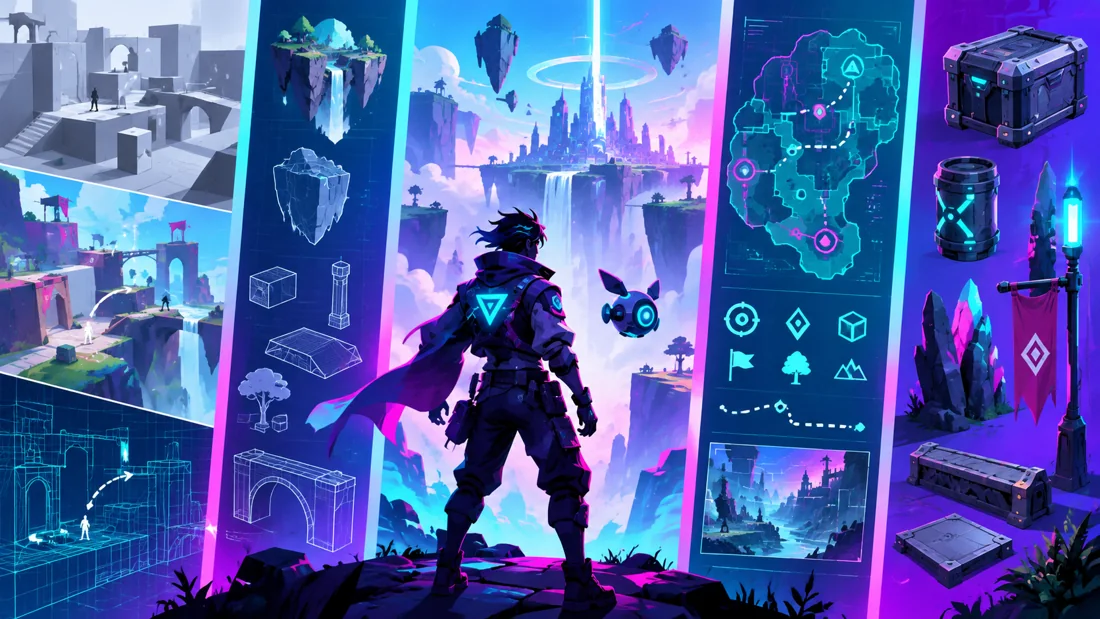
Concept illustration: level planning and game environments provide the setting for interactive systems.

02 / FROM IDEA TO FINISHED WORK

The game development production journey.

Follow each stage in order to understand its purpose, the decisions involved and how its result supports the next step. Review and revision are part of every stage.

01

Concept & playable scope

Define the core mechanic, player goal and smallest complete version of the game. List the systems required and distinguish essential features from optional ideas. Keeping scope manageable gives you time to test and improve the experience.

Practice focusDescribe a complete game loop that can be demonstrated in a small prototype.

02

Engine setup & prototyping

Organise the project and establish a basic test environment. Connect input, movement and feedback using the scripting approach covered by the programme. Use simple assets first so that the behaviour can be evaluated without waiting for finished art.

Practice focusBuild a prototype in which the player can act, receive feedback and reach a goal.

03

Gameplay systems & logic

Develop the rules and systems that support the core mechanic. Depending on the syllabus, these may include interaction, inventory, missions or saving progress. Work in small changes and test the connections between systems rather than treating each feature as isolated.

Practice focusCheck what happens when actions are repeated or performed in an unexpected order.
Creative reference: study how form, composition and visual detail support the finished image. Reference artwork, not a student project.
04

World, UI, audio & player feedback

Integrate the level, interface and sound so that the player understands the state of the game. Clear feedback communicates success, failure and available actions. Review how the environment and UI support navigation without overloading the screen.

Practice focusAsk a new player to try the prototype without a verbal explanation.

05

Advanced systems & iteration

Add only the advanced subjects included in the chosen programme, such as enemy behaviour, C++ or multiplayer. Introduce one layer of complexity at a time, keeping a working version available. Use playtest observations to decide what needs revision.

Practice focusRecord an issue, reproduce it and verify the result after a change.

06

Optimisation, build & portfolio

Review performance and reliability, prepare a build and test it outside the normal editing workflow. Provide clear controls and project notes. A portfolio presentation should demonstrate the working mechanic and explain your technical contribution and any shared resources.

Practice focusDeliver a tested build or demonstration with a concise systems breakdown.

03 / MAKE YOUR PROGRESS VISIBLE

Show the work. Explain the decisions.

Show a playable build or a short demonstration explaining the core mechanic. Describe the systems you implemented and one problem you solved. Clear controls and project notes help another person assess the work; the syllabus below specifies the engine, scripting and programming topics.

Keep the strongest work first. Use a short brief, selected process views and the final result to explain a project. Include feedback-driven improvements where they help someone understand your development. State which parts you created and credit shared assets.

04 / FIND YOUR DIRECTION

Connect your skills with a creative role.

Gameplay implementation and technical production roles need evidence of functioning systems. A playable build or a clear demonstration should explain the controls, mechanics and work you completed. Document a problem you solved instead of relying only on screenshots.

05 / YOUR LEARNING JOURNEY

Explore the programme in detail.

Read the programme information below for the exact training topics, software and practical work. Month headings describe the teaching schedule; the process above explains how those skills connect in a production. Where a syllabus groups several months together, that grouping is retained.

Visual references illustrate creative workflows, not student project results. Project complexity follows the selected syllabus. Course completion does not guarantee employment.

- Professional Diploma in Game Development
  • Duration: 1 Year + Internship | Basic to Advanced | Industry-Oriented | Portfolio-Based
Course Overview

The Professional Diploma in Game Development is a complete 1-year program designed to take students from beginner-level game development fundamentals to advanced gameplay production.

Students learn Unreal Engine, Blueprint Visual Scripting, character systems, gameplay mechanics, advanced UI, inventory systems, enemy AI, mission systems, save/load systems, optimization, debugging, version control, multiplayer fundamentals, and C++ fundamentals for Unreal Engine.

The course focuses on practical game production, with students developing multiple gameplay systems and completing a major final playable game project.

The program also includes portfolio development, career preparation, and industry-oriented internship training.

Software & Tools
  • Unreal Engine
  • Blueprint Visual Scripting
  • Visual Studio
  • C++ Fundamentals
  • Git & GitHub
  • Adobe Photoshop
  • Autodesk Maya / Blender — Optional for Game Asset Workflow
  • Fab / Megascans
  • Complete Course Workflow

Game Development Foundation → Unreal Engine → Blueprint Programming → Character Development → Gameplay Systems → Level Production → UI & Inventory → Advanced AI → Mission Systems → C++ → Multiplayer → Optimization → Professional Production → Final Game → Portfolio → Internship

Month 1 — Game Development Foundation
  • Fundamentals
  • Game Industry Overview
  • Game Development Pipeline
  • Game Design vs Game Development
  • Game Engines
  • Game Genres
  • Gameplay Mechanics
  • Game Logic
  • Game Architecture Basics
  • Assets
  • Levels
  • Characters
  • Game Testing
  • Publishing Overview
  • Unreal Engine
  • Interface
  • Project Creation
  • Viewport
  • Content Browser
  • Actors
  • Components
  • Transform Tools
  • Levels
  • Game Modes
  • Project Settings
  • Asset Import
  • Materials Basics
  • Fab / Megascans
  • Project Organization
  • Project
  • Basic Interactive Game Environment
Month 2 — Blueprint Programming Fundamentals
  • Event Graph
  • Nodes
  • Variables
  • Data Types
  • Branches
  • Conditions
  • Loops
  • Functions
  • Custom Events
  • Arrays
  • Structures Introduction
  • Enums Introduction
  • Timelines
  • Blueprint Interfaces
  • Blueprint Communication
  • Debugging
  • Reusable Blueprint Logic
  • Projects
  • Interaction System
  • Door System
  • Pickup System
  • Trigger Gameplay
  • Reusable Blueprint Component
Month 3 — Character Development & Animation
  • Character Systems
  • Character Blueprint
  • First-Person Controller
  • Third-Person Controller
  • Camera Systems
  • Sprint
  • Crouch
  • Jump
  • Health
  • Stamina
  • Damage
  • Respawn
  • Checkpoints
  • Fall Damage Basics
  • Animation Integration
  • Skeletal Meshes
  • Animation Blueprint
  • State Machines
  • Blend Spaces
  • Animation Montages
  • Animation Events
  • Basic IK Concepts
  • Character Animation Integration
  • Project
  • Complete Playable Character Controller
Month 4 — Gameplay Programming
  • Weapon Systems
  • Projectile Systems
  • Shooting Mechanics
  • Melee Basics
  • Interaction Systems
  • Collectibles
  • Score Systems
  • Objectives
  • Timers
  • Checkpoints
  • Physics-Based Gameplay
  • Damage Systems
  • Gameplay Events
  • Reusable Gameplay Components
  • Project
  • Action Gameplay Prototype
Month 5 — Level Development & World Building
  • Game Level Planning
  • Blockout
  • Level Flow
  • Modular Environment Workflow
  • Landscapes
  • Foliage
  • Lighting
  • Atmosphere
  • Post Processing
  • Collision
  • Navigation
  • Level Streaming Introduction
  • World Partition Introduction
  • Environment Optimization Basics
  • Project
  • Complete Playable Game Level
Creative reference: study composition, visual hierarchy and presentation in the finished image. Reference artwork, not student work.
Month 6 — UI, Inventory & Save Systems
  • UI Development
  • UMG
  • HUD
  • Health Bar
  • Stamina
  • Score
  • Main Menu
  • Pause Menu
  • Settings Menu
  • Game Over
  • Mission UI
  • Inventory UI
  • Inventory
  • Inventory System
  • Items
  • Pickup
  • Drop
  • Item Categories
  • Item Data
  • Equipment Basics
  • Inventory Interaction
  • Save & Load
  • Save Game System
  • Load Game
  • Player Progress
  • Checkpoint Saving
  • Settings Saving
  • Project
  • Complete UI + Inventory + Save System
Month 7 — Advanced Enemy AI
  • AI Controller
  • NavMesh
  • AI Perception
  • Sight
  • Hearing Basics
  • Behavior Trees
  • Blackboard
  • AI Tasks
  • Patrol
  • Chase
  • Search
  • Attack
  • Enemy States
  • AI Damage
  • AI Death
  • Multiple Enemy Types
  • AI Spawning Basics
  • Project
  • Advanced Enemy AI System
Month 8 — Advanced Gameplay & Mission Systems
  • Quest System
  • Mission System
  • Objective Tracking
  • Dialogue System Basics
  • Interaction Interfaces
  • Item Database Concepts
  • Character Stats
  • Experience System
  • Level-Up Basics
  • Spawn Systems
  • Wave Systems
  • Game Manager
  • Game State
  • Player State
  • Basic Data-Driven Gameplay
  • Project
  • Mission-Based Gameplay System
Month 9 — C++ Fundamentals for Unreal Engine
  • Programming Fundamentals
  • Introduction to Programming
  • Variables
  • Data Types
  • Operators
  • Conditions
  • Loops
  • Functions
  • Classes
  • Objects
  • Inheritance Basics
  • Object-Oriented Programming Introduction
  • Unreal C++
  • Unreal Project Structure
  • C++ Actors
  • Components
  • UPROPERTY
  • UFUNCTION
  • Blueprint + C++ Workflow
  • Exposing Variables to Blueprint
  • Exposing Functions to Blueprint
  • Basic Gameplay Class Creation
  • Basic C++ Debugging
  • Projects
  • Simple C++ Actor
  • C++ Interaction Component
  • Blueprint + C++ Gameplay Prototype
Month 10 — Multiplayer, Optimization & Version Control
  • Multiplayer Fundamentals
  • Client & Server Concepts
  • Multiplayer Architecture Basics
  • Replication Introduction
  • Player Spawn
  • Replicated Variables
  • RPC Introduction
  • Multiplayer Game Mode Basics
  • Multiplayer Testing
  • Optimization
  • FPS Analysis
  • Profiling Basics
  • LODs
  • Texture Optimization
  • Draw Call Awareness
  • Lighting Optimization
  • Blueprint Performance
  • Level Optimization
  • Memory Awareness
  • Git & GitHub
  • Version Control Fundamentals
  • Repository Setup
  • Commit
  • Push
  • Pull
  • Branch Basics
  • Team Workflow
  • Version Management
  • Project
  • Optimized Gameplay Prototype
Month 11 — Professional Game Production
  • Game Concept Development
  • Game Design Documentation Basics
  • Technical Planning
  • Feature Planning
  • Prototype Development
  • Production Milestones
  • Sprint Workflow
  • Task Planning
  • Bug Tracking
  • Debugging
  • Playtesting
  • User Feedback
  • Gameplay Balancing Basics
  • Production Review
  • Iteration
  • Final Project Pre-Production
  • Final Project Planning
  • Game Concept
  • Core Mechanics
  • Level Plan
  • Art Requirement
  • Programming Requirement
  • UI Plan
  • AI Plan
  • Audio Plan
  • Production Schedule
Month 12 — Final Game Project, Portfolio & Career Preparation
  • Final Game Development
  • Students will create a complete playable game featuring:
  • Character Controller
  • Gameplay Mechanics
  • UI
  • Inventory
  • Enemy AI
  • Mission / Objective System
  • Audio
  • Game Levels
  • Lighting
  • Save / Load
  • Menus
  • Game Completion System
  • Optimization
  • Final Packaged Build
  • Portfolio Development
  • Game Project Presentation
  • Gameplay Recording
  • Development Breakdown
  • Feature Breakdown
  • Screenshots
  • Portfolio Page
  • GitHub Project Presentation
  • Demo Build Preparation
  • Career Preparation
  • Resume Preparation
  • Portfolio Presentation
  • Interview Preparation
  • Technical Interview Basics
  • Game Studio Workflow
  • Freelance Game Development Basics
  • Team Collaboration Basics
  • Internship / Industry Production Training

After completing the 1-year training, students can participate in an industry-oriented internship or supervised game development production period.

  • Internship Activities
  • Game Prototype Development
  • Blueprint Scripting
  • Gameplay Feature Implementation
  • Level Implementation
  • UI Development
  • AI Implementation
  • Bug Fixing
  • Game Testing
  • Optimization
  • Version Control
  • Team Collaboration
  • Sprint Tasks
  • Production Reviews
  • Final Build Preparation
  • Project Documentation
  • Major Final Projects
  • Interactive Gameplay Prototype
  • Character Controller
  • Combat / Gameplay System
  • Complete Game Level
  • UI & HUD System
  • Inventory System
  • Advanced Enemy AI
  • Mission System
  • Save / Load System
  • Blueprint + C++ Prototype
  • Multiplayer Prototype
  • Optimized Game Build
  • Final Professional Game Project
  • Game Development Portfolio
  • Playable Demo Build
Course Outcome
  • By the end of the program, students will understand:
  • Unreal Engine
  • Blueprint Programming
  • Gameplay Development
  • Character Development
  • Animation Integration
  • UI Development
  • Inventory Systems
  • Save / Load Systems
  • Advanced Enemy AI
  • Behavior Trees
  • Mission Systems
  • Gameplay Architecture
  • C++ Fundamentals
  • Unreal C++ Basics
  • Multiplayer Fundamentals
  • Optimization
  • Debugging
  • Git & GitHub
  • Game Testing
  • Game Packaging
  • Professional Game Production
  • Portfolio Development
  • Industry Workflow
Career Opportunities
  • Students can explore entry-level and junior roles such as:
  • Junior Game Developer
  • Unreal Engine Developer
  • Blueprint Developer
  • Gameplay Programmer Trainee
  • Junior C++ Game Developer
  • Gameplay Systems Developer Trainee
  • Technical Game Designer
  • Level Implementation Developer
  • Junior AI Developer
  • Unreal Engine Generalist
  • Game QA / Technical Tester
  • Interactive Application Developer
  • Game Development Intern
  • Course Level
  • Basic → Intermediate → Advanced → Professional Game Production → Internship
Contact Management to Enrol

YOUR CREATIVE TOOLKIT

Software you'll explore

Follow the syllabus below for each tool’s role and learning level.

Adobe Photoshop
Unreal Engine