
Certificate Program in Video Editing with AI

Certificate Program in Video Editing with AI course concept artwork
Adobe Photoshop
+
Premiere Pro
◷ 3 Months◈ AI Multimedia
YOUR CREATIVE TOOLKIT
Adobe PhotoshopPremiere ProAfter EffectsAdobe Firefly

Certificate Program in Video Editing with AI

The full regular syllabus is retained. Additional AI modules support the same production workflow; manual skills, editing, cleanup and creative judgement remain part of training.

THE CREATIVE PROCESS / Video Editing

Give every cut a reason.

Editing shapes how a story unfolds. A held reaction, a change of rhythm or a well-placed sound can transform the meaning of the same footage. Begin by understanding the story and organising the material you have.

Build the rough cut around meaning and structure, then refine timing, audio, titles and colour. Try different versions of a short sequence and compare the effect. Review speech clarity, continuity and text readability in the complete edit rather than judging isolated shots.

Explore the complete creative process below, then read the selected programme syllabus for its software, topics and project scope. These production stages explain how the discipline works; they are not a replacement for the month-by-month training plan.

01 / THINK LIKE A CREATOR

What can you create?

Shape interviews, social videos, advertisements and short narrative sequences. Different formats need different pacing, but each edit benefits from a clear purpose. Work with a manageable selection of footage so that story, sound and finish can all receive attention.
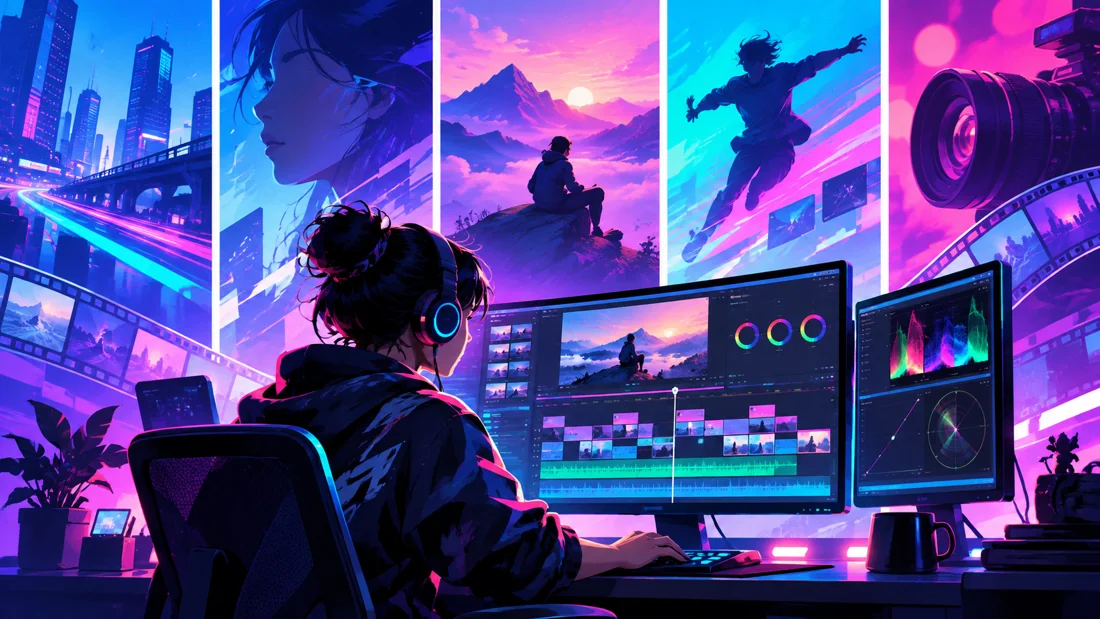
Concept illustration: selecting shots, building a timeline and reviewing colour form a post-production workflow.

02 / FROM IDEA TO FINISHED WORK

The video editing production journey.

Follow each stage in order to understand its purpose, the decisions involved and how its result supports the next step. Review and revision are part of every stage.

01

Brief, footage & organisation

Understand the purpose, audience and delivery format before editing. Review the available footage, identify useful takes and organise the project. Clear names and consistent bins make revisions easier when the timeline becomes more complex.

Practice focusPrepare an organised project and select the material that supports the story.

02

Assembly & story structure

Build an initial sequence around meaning rather than polished transitions. Establish the opening, development and ending, and check that each shot contributes. A rough cut reveals gaps in the story before you spend time finishing individual moments.

Practice focusExplain what the viewer should understand at each stage of the edit.

03

Pacing, continuity & timing

Refine the duration and order of shots. Compare how a cut changes when it happens a little earlier or later, and use reactions or supporting images where they help the sequence. Watch the complete edit to assess rhythm and continuity.

Practice focusCreate two versions of a short sequence and compare their emotional effect.
Creative reference: study how form, composition and visual detail support the finished image. Reference artwork, not a student project.
04

Dialogue, sound & music

Clean and balance the audio covered by the syllabus, keeping speech understandable. Music and sound effects should support the message without competing with it. Listen through the whole sequence and review changes between clips as well as individual levels.

Practice focusCheck dialogue clarity and transitions using ordinary listening conditions.

05

Titles, motion, colour & finishing

Develop readable titles and any required motion elements. Review exposure and colour consistency across shots before applying a creative finish. Effects should support the edit; the programme syllabus specifies the depth of motion graphics, VFX and grading included.

Practice focusReview text on a small screen and compare adjacent shots for consistency.

06

Export, review & showreel

Export for the intended destination, then play the exported file from beginning to end. Check framing, audio, titles and the final frame. Select portfolio pieces that make your editing contribution clear and credit supplied footage or other shared assets.

Practice focusDeliver a checked final edit with a short project description.

03 / MAKE YOUR PROGRESS VISIBLE

Show the work. Explain the decisions.

Present a focused selection of finished edits with a short description of their purpose and your role. Social content, advertising and narrative work need different examples. A before-and-after breakdown can explain your contribution, while the finished edit remains the centre of the presentation.

Keep the strongest work first. Use a short brief, selected process views and the final result to explain a project. Include feedback-driven improvements where they help someone understand your development. State which parts you created and credit shared assets.

04 / FIND YOUR DIRECTION

Connect your skills with a creative role.

Social content, advertising, corporate editing and narrative work call for different examples. Show finished edits with clear descriptions of your role and the intended audience. Include motion graphics or colour work only where they reflect skills you have developed.

05 / YOUR LEARNING JOURNEY

Explore the programme in detail.

Read the programme information below for the exact training topics, software and practical work. Month headings describe the teaching schedule; the process above explains how those skills connect in a production. Where a syllabus groups several months together, that grouping is retained.

Visual references illustrate creative workflows, not student project results. Project complexity follows the selected syllabus. Course completion does not guarantee employment.

Core Programme Syllabus
  • Certificate Program in Video Editing
  • Duration: 3 Months | Basic to Advanced | Industry-Oriented
Course Summary

This intensive 3-month Certificate Program in Video Editing is designed to take students from complete beginners to advanced, industry-oriented video editing practice. The program focuses on developing strong skills in video editing, storytelling, visual communication, audio, color, motion graphics, animation, basic visual effects, and professional content production.

The course follows a structured Basic → Intermediate → Advanced → Professional learning pathway. Students will learn how to transform raw footage into engaging and professional video content for YouTube, Instagram, digital advertising, promotional campaigns, social media, and branded content.

The program combines editing theory, software training, practical exercises, creative assignments, real-world projects, motion graphics, content creation, and portfolio development. Students will learn the complete workflow from importing and organizing footage to editing, sound design, color correction, motion graphics, visual effects, rendering, and final delivery.

Students will receive hands-on training in Adobe Photoshop, Adobe Premiere Pro, and Adobe After Effects, with each software taught according to its role in a professional video-production workflow.

Month 1 – Video Editing Foundation & Creative Content

The first month focuses on developing a strong foundation in visual storytelling, editing principles, image preparation, and basic video production.

  • Adobe Photoshop
  • Photoshop Interface & Workspace
  • Layers, Masks & Selection Tools
  • Image Editing & Retouching
  • Image Optimization for Video
  • Thumbnail Design
  • YouTube Thumbnail Design
  • Social Media Graphics
  • Basic Text & Graphic Composition
  • Video Editing Fundamentals
  • Introduction to Video Editing
  • Understanding Video Formats & Resolutions
  • Frame Rate & Aspect Ratio
  • Video File Formats & Codecs
  • Understanding the Editing Workflow
  • Storytelling Through Editing
  • Shot Selection & Sequencing
  • Adobe Premiere Pro
  • Premiere Pro Interface & Workspace
  • Project Setup & Media Management
  • Importing & Organizing Footage
  • Timeline & Sequence Settings
  • Cutting & Trimming
  • Basic Timeline Editing
  • Clip Arrangement
  • Basic Transitions
  • Basic Effects
  • Export & Render Settings
  • Practical Projects
  • Basic Editing Exercise
  • Short Video Edit
  • YouTube Thumbnail
  • Social Media Video
  • Simple Storytelling Project
Month 2 – Advanced Video Editing & Content Production

The second month moves students into intermediate and advanced Premiere Pro workflows, focusing on professional editing, sound, color, pacing, and social media content.

  • Advanced Premiere Pro
  • Advanced Cutting Techniques
  • Multi-Track Editing
  • Advanced Timeline Workflow
  • J-Cut & L-Cut
  • Continuity Editing
  • B-Roll Editing
  • Montage Editing
  • Dynamic Editing
  • Advanced Transitions
  • Adjustment Layers
  • Effects & Presets
  • Audio & Sound
  • Audio Editing Fundamentals
  • Dialogue Editing
  • Background Music
  • Sound Effects
  • Audio Levels & Mixing
  • Noise Reduction
  • Voice Enhancement
  • Audio Transitions
  • Basic Sound Design
  • Color
  • Color Correction
  • Exposure & White Balance
  • Skin Tone Correction
  • Color Matching
  • Color Grading Basics
  • Creative Looks
  • LUTs & Presets
  • Advanced Content Creation
  • Speed Ramping
  • Slow Motion & Time Remapping
  • Titles & Subtitles
  • Lower Thirds
  • Captions
  • YouTube Video Editing
  • Instagram Reels
  • Short-Form Content
  • Promotional Videos
  • Social Media Advertisements
  • Practical Projects
  • YouTube Video
  • Instagram Reel
  • Promotional Video
  • Interview / Talking-Head Edit
  • Social Media Advertisement
Month 3 – Motion Graphics, Animation & Basic VFX

The third month introduces Adobe After Effects and focuses on motion graphics, animation, visual effects, and advanced post-production.

  • Adobe After Effects Fundamentals
  • After Effects Interface & Workspace
  • Composition Setup
  • Layers & Timeline
  • Keyframes
  • Position, Scale, Rotation & Opacity
  • Parenting & Null Objects
  • Basic Graph Editor
  • Motion Principles
  • Motion Graphics
  • Text Animation
  • Shape Animation
  • Logo Animation
  • Icon Animation
  • Lower Third Animation
  • Title Animation
  • Social Media Motion Graphics
  • Promotional Motion Graphics
  • Animated Brand Elements
  • Basic VFX
  • Masking
  • Green Screen / Chroma Key Basics
  • Motion Tracking
  • Object Tracking
  • Basic Rotoscoping
  • Screen Replacement Basics
  • Visual Effects Compositing
  • Basic Effects & Presets
  • Professional Post-Production
  • Premiere Pro + After Effects Workflow
  • Dynamic Link Workflow
  • Motion Graphics Integration
  • Video Finishing
  • Final Color & Audio Check
  • Export Settings for Different Platforms
  • YouTube Delivery
  • Instagram / Social Media Delivery
Final Projects
  • Motion Graphics Video
  • Logo Animation
  • Promotional Motion Graphic
  • Basic VFX Shot
  • Final Video Project
Core Software — Must Learn
  • 1. Adobe Photoshop
  • Thumbnails • Graphics • Image Editing • Visual Preparation

Photoshop is used for creating thumbnails, editing images, preparing graphics, and developing visual assets required for video projects.

  • 2. Adobe Premiere Pro
  • Professional Video Editing • Storytelling • Audio • Color • Content Production

Premiere Pro is the primary editing software used to develop professional videos, YouTube content, reels, advertisements, promotional videos, and other digital content.

  • 3. Adobe After Effects
  • Motion Graphics • Animation • Logo Animation • Basic VFX

After Effects is used to create professional motion graphics, animated titles, logo animations, visual effects, transitions, and other advanced visual elements.

Final Portfolio Projects

By the end of the program, students will develop a Professional Video Editing Portfolio containing multiple industry-oriented projects.

  • 1. Professional Thumbnail Design

Students will create high-quality thumbnails for YouTube and digital content using Photoshop, focusing on composition, typography, image manipulation, visual hierarchy, and click-focused design.

  • 2. YouTube Video
  • Students will edit a complete YouTube video using Premiere Pro, including:
  • Raw Footage Organization
  • Story Structure
  • Cutting & Trimming
  • B-Roll
  • Titles
  • Audio Editing
  • Color Correction
  • Transitions
  • Final Export
  • 3. Instagram Reel / Short-Form Video
  • Students will create a professional short-form video optimized for social media.
  • Vertical 9:16 Format
  • Fast-Paced Editing
  • Captions
  • Sound Effects
  • Music
  • Speed Ramping
  • Motion Elements
  • Social Media Export
  • 4. Promotional / Advertising Video
  • Students will create a short promotional video for a brand, product, service, or campaign.
  • The project will include:
  • Creative Concept
  • Storyboard / Visual Plan
  • Footage Selection
  • Editing
  • Typography
  • Brand Elements
  • Music & Sound Effects
  • Color Treatment
  • Motion Graphics
  • Final Advertisement
  • 5. Motion Graphics Project
  • Students will create an animated graphic sequence using After Effects.
  • Projects may include:
  • Animated Typography
  • Logo Animation
  • Lower Thirds
  • Social Media Motion Graphics
  • Promotional Animation
  • Title Sequence
  • 6. Basic VFX Project
  • Students will create a short VFX-based shot demonstrating:
  • Masking
  • Green Screen
  • Motion Tracking
  • Rotoscoping Basics
  • Compositing
  • Visual Effects
  • 7. Final Video Project

Students will independently develop a complete video project from concept to final delivery, applying the editing, audio, color, motion graphics, and VFX skills learned throughout the program.

  • 🎞️ Professional Showreel
  • The final stage of the course focuses on Showreel Creation.

Students will select their strongest work and create a professional Video Editing & Motion Graphics Showreel demonstrating their skills across multiple areas.

  • The Showreel can include:
  • YouTube Editing
  • Short-Form / Reel Editing
  • Promotional Video
  • Advertisement
  • Motion Graphics
  • Logo Animation
  • Typography Animation
  • Basic VFX
  • Color Grading
  • Audio & Sound Design

Students will learn how to select, sequence, edit, music-sync, present, and export their work professionally.

Course Outcome

By the end of this 3-month program, students will progress from basic video editing knowledge to advanced, industry-oriented post-production practice.

  • Students will be able to:
  • Understand professional video-editing workflows
  • Organize and manage raw footage
  • Develop visual storytelling through editing
  • Edit YouTube and long-form videos
  • Create engaging Instagram Reels and short-form content
  • Produce promotional and advertising videos
  • Perform professional cutting and sequencing
  • Edit and mix basic audio
  • Apply color correction and basic color grading
  • Create speed ramps and dynamic edits
  • Design thumbnails and supporting graphics
  • Create professional titles and subtitles
  • Develop motion graphics and animations
  • Animate logos and brand elements
  • Perform basic VFX and compositing
  • Use Premiere Pro and After Effects together
  • Prepare videos for different digital platforms
  • Present creative work professionally
  • Build portfolio-ready video projects
  • Create a professional video editing showreel
  • Overall Learning Path

Video & Design Fundamentals ↓ Photoshop & Visual Asset Creation ↓ Premiere Pro – Basic Editing ↓ Advanced Editing & Storytelling ↓ Audio & Color ↓ YouTube & Social Media Content ↓ After Effects & Motion Graphics ↓ Animation & Basic VFX ↓ Professional Post-Production ↓ Final Projects & Portfolio ↓ Professional Showreel

  • Final Course Positioning

“3-Month Certificate Program in Video Editing – Basic to Advanced | Professional Software | Video Editing & Motion Graphics | Industry-Oriented Projects | Portfolio & Showreel Development”

Additional AI Tools & Practical Modules

The full regular syllabus is retained. Additional AI modules support the same production workflow; manual skills, editing, cleanup and creative judgement remain part of training.

Module 1 — Adobe Premiere Pro AI Features
  • Speech-to-text and automatic captions
  • Transcript correction and caption styling
  • Text-based editing for interview rough cuts
  • Enhance Speech and dialogue cleanup
  • Generative Extend introduction and output review
Module 2 — Adobe Firefly
  • Prompt writing for video production
  • Text-to-video and image-to-video
  • Supporting shots for advertisements and social content
  • Shot consistency, quality checking and editorial selection
  • Importing generated clips into Premiere Pro
Module 3 — ElevenLabs
  • AI voice-over from approved scripts
  • Voice selection, pronunciation and pacing
  • Dubbing workflows and human review
  • Generating sound effects
  • Integrating voice and effects into the edit
Practical Projects
  • Captioned interview or social reel
  • AI-assisted promotional video
  • A 30-second advertisement with generated visuals, voice-over and sound design
Training Levels

The certificate pathway introduces captions, speech cleanup, basic AI visuals and voice-over. The six-month pathway adds deeper text-based editing, dubbing and integrated advertising production.

Responsible Production

Use voices with permission, review generated output and check asset usage rights. Tool subscriptions, credits and feature availability may vary.

Programme Planning

The duration shown is the core programme duration. Ask admissions about AI session allocation, tool access and any additional training time before enrolling.

Contact Management to Enrol

YOUR CREATIVE TOOLKIT

Software you'll explore

Follow the syllabus below for each tool’s role and learning level.

Adobe Photoshop
Premiere Pro
After Effects
Adobe Firefly